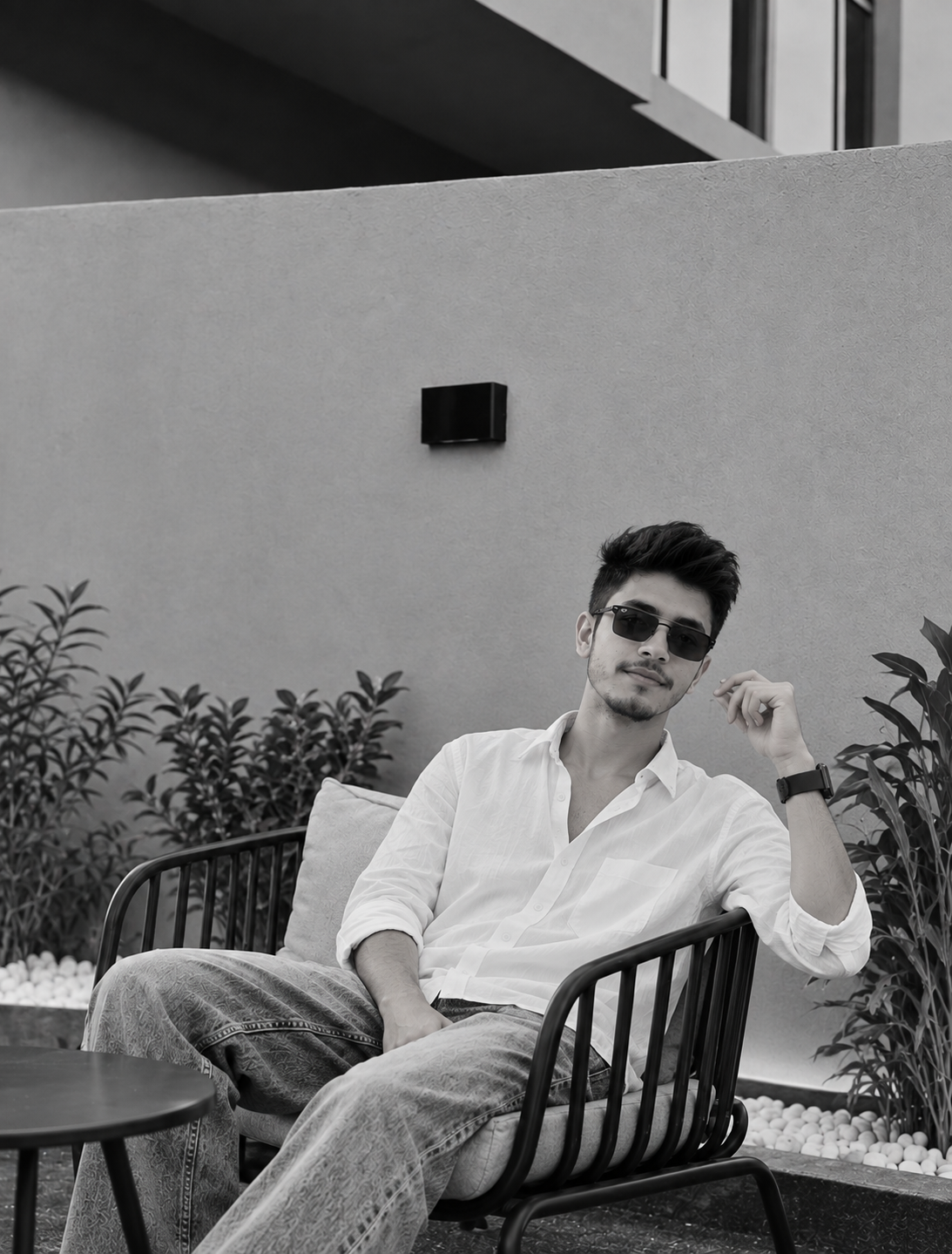
This Black and White AI Photo Editing Prompt is perfect for creating a clean and sophisticated monochrome portrait. It features a white shirt, sunglasses, relaxed seating, modern architecture and minimal greenery. The high-contrast black-and-white treatment gives the image a timeless editorial and Instagram aesthetic.
Uncategorized
Black and White AI Photo Editing Prompt for Boys
◉ 4 Views♡ 1 Likes
Prompt 1
Prompt 1
Use the uploaded reference image as the main identity reference and create an ultra-realistic high-end black-and-white editorial portrait of the same person.
IDENTITY:
Preserve the exact facial identity, face shape, facial structure, skin texture, hairstyle, eyes, eyebrows, nose, lips and recognizable features from the uploaded reference image. Keep the person's identity consistent and do not replace or redesign the face.
OUTFIT:
Dress the person in a clean, relaxed white button-up shirt with the sleeves naturally rolled up. Pair it with loose-fitting traditional-inspired patterned trousers with subtle fabric texture.
Keep the clothing realistic with natural folds, stitching and wrinkles.
ACCESSORIES:
Add stylish dark rectangular sunglasses and a simple modern smartwatch on the wrist.
POSE:
Create a relaxed seated fashion pose. The person is comfortably sitting in a modern black metal outdoor chair with one arm resting naturally on the chair and the other hand placed casually near the lap.
Keep one leg slightly extended toward the foreground and maintain a confident, calm expression.
HAIR:
Keep the person's short, thick hairstyle with natural volume and realistic individual hair strands.
LOCATION:
Place the subject in a modern minimalist outdoor patio or terrace.
Add a smooth textured concrete wall in the background, minimalist architectural elements, simple decorative plants and small white stones around the plants.
Include a simple round table partially visible in the foreground.
LIGHTING:
Use soft directional natural daylight with subtle shadows across the wall and subject.
Create gentle highlights on the face, shirt and hair while maintaining realistic contrast.
BLACK AND WHITE STYLE:
Convert the entire image into a premium monochrome black-and-white photograph.
Use rich blacks, clean whites and detailed mid-tones. Maintain realistic skin texture and clothing details without making the image look flat.
PHOTOGRAPHY STYLE:
Ultra-realistic professional DSLR photography, high-end monochrome fashion photography, cinematic editorial portrait, realistic skin texture, detailed hair, natural fabric texture, shallow depth of field, strong composition, subtle film grain, high dynamic range, professional magazine photography, 4K detail.
COMPOSITION:
Vertical 9:16 portrait composition. Keep the person as the main subject and show the modern chair, minimalist wall, plants and foreground table to establish the environment.
Use a slightly low camera angle for a confident fashion-editorial appearance.
COLOR:
Pure black-and-white monochrome photography. No colored objects or color casts. Maintain natural grayscale tones with realistic highlights and shadows.
IMPORTANT:
Preserve the person's original facial identity and natural appearance. Do not excessively smooth the skin or change facial proportions. Maintain realistic hands, fingers, body anatomy and clothing.
NEGATIVE PROMPT:
different face, changed identity, distorted facial features, plastic skin, excessive beauty filter, extra fingers, missing fingers, extra hands, deformed hands, bad anatomy, unnatural body proportions, duplicate person, blurry face, distorted eyes, unrealistic hair, malformed sunglasses, distorted chair, fake plants, cartoon, anime, CGI, low quality, excessive contrast, crushed shadows, overexposed highlights, color image, text, watermark, logo.
What These Prompts Create
This prompt creates a premium black-and-white editorial portrait of a boy wearing a white shirt, sunglasses and relaxed trousers while sitting in a modern outdoor chair. Minimal architecture, plants, white stones and dramatic monochrome tones give the image a sophisticated Instagram fashion aesthetic.
How to Use These Prompts
1. Upload your original photo as the reference image.
2. Copy the complete prompt above.
3. Paste it into your AI photo editing tool.
4. Enable the reference image or identity-preservation option.
5. Select a 9:16 vertical aspect ratio.
6. Generate the image.
7. If the face changes, regenerate using a stronger identity/reference setting.
2. Copy the complete prompt above.
3. Paste it into your AI photo editing tool.
4. Enable the reference image or identity-preservation option.
5. Select a 9:16 vertical aspect ratio.
6. Generate the image.
7. If the face changes, regenerate using a stronger identity/reference setting.
Tips for Better Results
- Use a clear high-quality reference photo.
- Keep the face clearly visible.
- Enable identity preservation when available.
- Use a 9:16 vertical aspect ratio.
- Use strong but natural monochrome contrast.
- Keep the original facial features unchanged.
- Use minimalist backgrounds for a premium look.
- Keep the skin texture realistic.
- Avoid excessive sharpening or beauty filters.
Who Are These Prompts For?
This prompt is suitable for Instagram users, male fashion creators, lifestyle creators, AI photo editors, photographers and anyone who wants to create stylish black-and-white portraits with AI.
More Details
This AI photo editing prompt combines minimalist outdoor fashion with classic monochrome photography. The white shirt, dark sunglasses, modern black chair and simple architectural background create a clean editorial appearance. Rich grayscale tones, natural shadows and subtle film texture give the final image a timeless photography style.